 d0f6a9e211
|
||
|---|---|---|
| .. | ||
| README.md | ||
| image.jpg | ||
| index.html | ||
| main.css | ||
| main.js | ||

README.md
Chat overlay
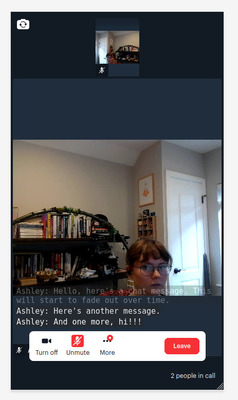
What does this demo do?
- Adds full-screen Daily Prebuilt to a page
- Using
app-messageandsendAppMessage(), send and receive chat messages (with or withoutenable_chatset totruein the room) - Allow users to send and receive chat messages while viewing other participants' videos
Getting started
- Clone this repository and navigate to this folder (
git clone git@github.com:daily-demos/examples.git && cd prebuilt-ui/chat-overlay) - Set
ROOM_URLon the first line ofmain.jsto a Daily room you have created. Sign up and create a room from the Daily dashboard, if you haven't already! - Run a server from this repo's directory. You can use something like
python -m SimpleHTTPServerrun on the command line in the repo's directory or use VSCode's Live Server extension. See How do you set up a local testing server? for more info. - Register for a Daily.co account and create a Room in the dashboard, and use that room URL on this page. You can join that room directly using other browser tabs or another device.
- Visit the server in your browser! You can use multiple tabs for testing out the chat experience.