 Five‑minute tour
```bash
# 1. Make sure you have Backlog.md installed (global installation recommended)
bun i -g backlog.md
or
npm i -g backlog.md
or
brew install backlog-md
# 2. Bootstrap a repo + backlog and choose the AI Agent integration mode (MCP, CLI, or skip)
backlog init "My Awesome Project"
# 3. Create tasks manually
backlog task create "Render markdown as kanban"
# 4. Or ask AI to create them: Claude Code, Gemini CLI, or Codex (Agents automatically use Backlog.md via MCP or CLI)
Claude I would like to build a search functionality in the web view that searches for:
* tasks
* docs
* decisions
Please create relevant tasks to tackle this request.
# 5. See where you stand
backlog board view or backlog browser
# 6. Assign tasks to AI (Backlog.md instructions tell agents how to work with tasks)
Claude please implement all tasks related to the web search functionality (task-10, task-11, task-12)
* before starting to write code use 'ultrathink mode' to prepare and add an implementation plan to the task
* use multiple sub-agents when possible and dependencies allow
```
All data is saved under `backlog` folder as human‑readable Markdown with the following format `task-
Five‑minute tour
```bash
# 1. Make sure you have Backlog.md installed (global installation recommended)
bun i -g backlog.md
or
npm i -g backlog.md
or
brew install backlog-md
# 2. Bootstrap a repo + backlog and choose the AI Agent integration mode (MCP, CLI, or skip)
backlog init "My Awesome Project"
# 3. Create tasks manually
backlog task create "Render markdown as kanban"
# 4. Or ask AI to create them: Claude Code, Gemini CLI, or Codex (Agents automatically use Backlog.md via MCP or CLI)
Claude I would like to build a search functionality in the web view that searches for:
* tasks
* docs
* decisions
Please create relevant tasks to tackle this request.
# 5. See where you stand
backlog board view or backlog browser
# 6. Assign tasks to AI (Backlog.md instructions tell agents how to work with tasks)
Claude please implement all tasks related to the web search functionality (task-10, task-11, task-12)
* before starting to write code use 'ultrathink mode' to prepare and add an implementation plan to the task
* use multiple sub-agents when possible and dependencies allow
```
All data is saved under `backlog` folder as human‑readable Markdown with the following format `task- Web Interface
Launch a modern, responsive web interface for visual task management:
```bash
# Start the web server (opens browser automatically)
backlog browser
# Custom port
backlog browser --port 8080
# Don't open browser automatically
backlog browser --no-open
```
**Features:**
- Interactive Kanban board with drag-and-drop
- Task creation and editing with rich forms
- Interactive acceptance criteria editor with checklists
- Real-time updates across all views
- Responsive design for desktop and mobile
- Task archiving with confirmation dialogs
- Seamless CLI integration - all changes sync with markdown files
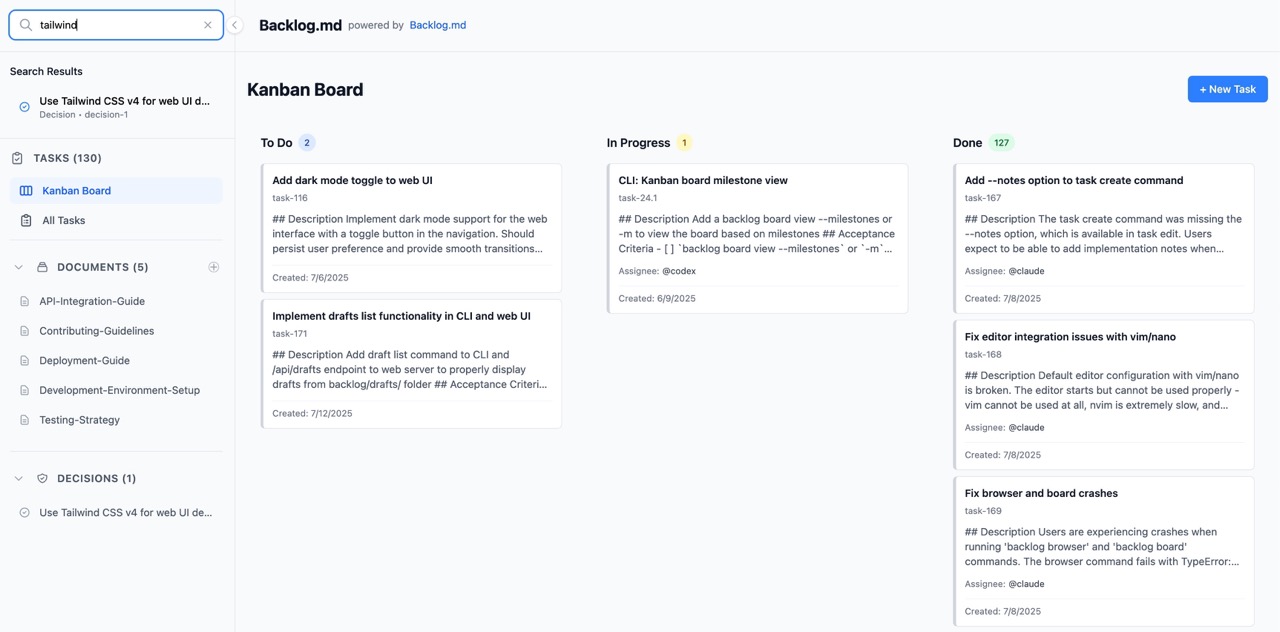
---
## 🔧 MCP Integration (Model Context Protocol)
The easiest way to connect Backlog.md to AI coding assistants like Claude Code, Codex, and Gemini CLI is via the MCP protocol.
You can run `backlog init` (even if you already initialized Backlog.md) to set up MCP integration automatically, or follow the manual steps below.
### Client guides
> [!IMPORTANT]
> When adding the MCP server manually, you should add some extra instructions in your CLAUDE.md/AGENTS.md files to inform the agent about Backlog.md.
> This step is not required when using `backlog init` as it adds these instructions automatically.
> Backlog.md's instructions for agents are available at [`/src/guidelines/mcp/agent-nudge.md`](/src/guidelines/mcp/agent-nudge.md).
Web Interface
Launch a modern, responsive web interface for visual task management:
```bash
# Start the web server (opens browser automatically)
backlog browser
# Custom port
backlog browser --port 8080
# Don't open browser automatically
backlog browser --no-open
```
**Features:**
- Interactive Kanban board with drag-and-drop
- Task creation and editing with rich forms
- Interactive acceptance criteria editor with checklists
- Real-time updates across all views
- Responsive design for desktop and mobile
- Task archiving with confirmation dialogs
- Seamless CLI integration - all changes sync with markdown files

---
## 🔧 MCP Integration (Model Context Protocol)
The easiest way to connect Backlog.md to AI coding assistants like Claude Code, Codex, and Gemini CLI is via the MCP protocol.
You can run `backlog init` (even if you already initialized Backlog.md) to set up MCP integration automatically, or follow the manual steps below.
### Client guides
> [!IMPORTANT]
> When adding the MCP server manually, you should add some extra instructions in your CLAUDE.md/AGENTS.md files to inform the agent about Backlog.md.
> This step is not required when using `backlog init` as it adds these instructions automatically.
> Backlog.md's instructions for agents are available at [`/src/guidelines/mcp/agent-nudge.md`](/src/guidelines/mcp/agent-nudge.md).
Claude Code
```bash claude mcp add backlog --scope user -- backlog mcp start ```Codex
```bash codex mcp add backlog backlog mcp start ```Gemini CLI
```bash gemini mcp add backlog -s user backlog mcp start ``` CLI reference
### Project Setup
| Action | Example |
|-------------|------------------------------------------------------|
| Initialize project | `backlog init [project-name]` (creates backlog structure with a minimal interactive flow) |
| Re-initialize | `backlog init` (preserves existing config, allows updates) |
| Advanced settings wizard | `backlog config` (no args) — launches the full interactive configuration flow |
`backlog init` keeps first-run setup focused on the essentials:
- **Project name** – identifier for your backlog (defaults to the current directory on re-run).
- **Integration choice** – decide whether your AI tools connect through the **MCP connector** (recommended) or stick with **CLI commands (legacy)**.
- **Instruction files (CLI path only)** – when you choose the legacy CLI flow, pick which instruction files to create (CLAUDE.md, AGENTS.md, GEMINI.md, Copilot, or skip).
- **Advanced settings prompt** – default answer “No” finishes init immediately; choosing “Yes” jumps straight into the advanced wizard documented in [Configuration](#configuration).
You can rerun the wizard anytime with `backlog config`. All existing CLI flags (for example `--defaults`, `--agent-instructions`, or `--install-claude-agent true`) continue to provide fully non-interactive setups, so existing scripts keep working without change.
### Documentation
- Document IDs are global across all subdirectories under `backlog/docs`. You can organize files in nested folders (e.g., `backlog/docs/guides/`), and `backlog doc list` and `backlog doc view
CLI reference
### Project Setup
| Action | Example |
|-------------|------------------------------------------------------|
| Initialize project | `backlog init [project-name]` (creates backlog structure with a minimal interactive flow) |
| Re-initialize | `backlog init` (preserves existing config, allows updates) |
| Advanced settings wizard | `backlog config` (no args) — launches the full interactive configuration flow |
`backlog init` keeps first-run setup focused on the essentials:
- **Project name** – identifier for your backlog (defaults to the current directory on re-run).
- **Integration choice** – decide whether your AI tools connect through the **MCP connector** (recommended) or stick with **CLI commands (legacy)**.
- **Instruction files (CLI path only)** – when you choose the legacy CLI flow, pick which instruction files to create (CLAUDE.md, AGENTS.md, GEMINI.md, Copilot, or skip).
- **Advanced settings prompt** – default answer “No” finishes init immediately; choosing “Yes” jumps straight into the advanced wizard documented in [Configuration](#configuration).
You can rerun the wizard anytime with `backlog config`. All existing CLI flags (for example `--defaults`, `--agent-instructions`, or `--install-claude-agent true`) continue to provide fully non-interactive setups, so existing scripts keep working without change.
### Documentation
- Document IDs are global across all subdirectories under `backlog/docs`. You can organize files in nested folders (e.g., `backlog/docs/guides/`), and `backlog doc list` and `backlog doc view  Configuration
Backlog.md merges the following layers (highest → lowest):
1. CLI flags
2. `backlog/config.yml` (per‑project)
3. `~/backlog/user` (per‑user)
4. Built‑ins
### Configuration Commands
| Action | Example |
|-------------|------------------------------------------------------|
| View all configs | `backlog config list` |
| Get specific config | `backlog config get defaultEditor` |
| Set config value | `backlog config set defaultEditor "code --wait"` |
| Enable auto-commit | `backlog config set autoCommit true` |
| Bypass git hooks | `backlog config set bypassGitHooks true` |
| Enable cross-branch check | `backlog config set checkActiveBranches true` |
| Set active branch days | `backlog config set activeBranchDays 30` |
### Interactive wizard (`backlog config`)
Run `backlog config` with no arguments to launch the full interactive wizard. This is the same experience triggered from `backlog init` when you opt into advanced settings, and it walks through the complete configuration surface:
- Cross-branch accuracy: `checkActiveBranches`, `remoteOperations`, and `activeBranchDays`.
- Git workflow: `autoCommit` and `bypassGitHooks`.
- ID formatting: enable or size `zeroPaddedIds`.
- Editor integration: pick a `defaultEditor` with availability checks.
- Web UI defaults: choose `defaultPort` and whether `autoOpenBrowser` should run.
Skipping the wizard (answering “No” during init) applies the safe defaults that ship with Backlog.md:
- `checkActiveBranches=true`, `remoteOperations=true`, `activeBranchDays=30`.
- `autoCommit=false`, `bypassGitHooks=false`.
- `zeroPaddedIds` disabled.
- `defaultEditor` unset (falls back to your environment).
- `defaultPort=6420`, `autoOpenBrowser=true`.
Whenever you revisit `backlog init` or rerun `backlog config`, the wizard pre-populates prompts with your current values so you can adjust only what changed.
### Available Configuration Options
| Key | Purpose | Default |
|-------------------|--------------------|-------------------------------|
| `defaultAssignee` | Pre‑fill assignee | `[]` |
| `defaultStatus` | First column | `To Do` |
| `statuses` | Board columns | `[To Do, In Progress, Done]` |
| `dateFormat` | Date/time format | `yyyy-mm-dd hh:mm` |
| `timezonePreference` | Timezone for dates | `UTC` |
| `includeDatetimeInDates` | Add time to new dates | `true` |
| `defaultEditor` | Editor for 'E' key | Platform default (nano/notepad) |
| `defaultPort` | Web UI port | `6420` |
| `autoOpenBrowser` | Open browser automatically | `true` |
| `remoteOperations`| Enable remote git operations | `true` |
| `autoCommit` | Automatically commit task changes | `false` |
| `bypassGitHooks` | Skip git hooks when committing (uses --no-verify) | `false` |
| `zeroPaddedIds` | Pad all IDs (tasks, docs, etc.) with leading zeros | `(disabled)` |
| `checkActiveBranches` | Check task states across active branches for accuracy | `true` |
| `activeBranchDays` | How many days a branch is considered active | `30` |
| `onStatusChange` | Shell command to run on status change | `(disabled)` |
> Editor setup guide: See [Configuring VIM and Neovim as Default Editor](backlog/docs/doc-002%20-%20Configuring-VIM-and-Neovim-as-Default-Editor.md) for configuration tips and troubleshooting interactive editors.
> **Note**: Set `remoteOperations: false` to work offline. This disables git fetch operations and loads tasks from local branches only, useful when working without network connectivity.
> **Git Control**: By default, `autoCommit` is set to `false`, giving you full control over your git history. Task operations will modify files but won't automatically commit changes. Set `autoCommit: true` if you prefer automatic commits for each task operation.
> **Git Hooks**: If you have pre-commit hooks (like conventional commits or linters) that interfere with backlog.md's automated commits, set `bypassGitHooks: true` to skip them using the `--no-verify` flag.
> **Performance**: Cross-branch checking ensures accurate task tracking across all active branches but may impact performance on large repositories. You can disable it by setting `checkActiveBranches: false` for maximum speed, or adjust `activeBranchDays` to control how far back to look for branch activity (lower values = better performance).
> **Status Change Callbacks**: Set `onStatusChange` to run a shell command whenever a task's status changes. Available variables: `$TASK_ID`, `$OLD_STATUS`, `$NEW_STATUS`, `$TASK_TITLE`. Per-task override via `onStatusChange` in task frontmatter. Example: `'if [ "$NEW_STATUS" = "In Progress" ]; then claude "Task $TASK_ID ($TASK_TITLE) has been assigned to you. Please implement it." & fi'`
> **Date/Time Support**: Backlog.md now supports datetime precision for all dates. New items automatically include time (YYYY-MM-DD HH:mm format in UTC), while existing date-only entries remain unchanged for backward compatibility. Use the migration script `bun src/scripts/migrate-dates.ts` to optionally add time to existing items.
---
## 💡 Shell Tab Completion
Backlog.md includes built-in intelligent tab completion for bash, zsh, and fish shells. Completion scripts are embedded in the binary—no external files needed.
**Quick Installation:**
```bash
# Auto-detect and install for your current shell
backlog completion install
# Or specify shell explicitly
backlog completion install --shell bash
backlog completion install --shell zsh
backlog completion install --shell fish
```
**What you get:**
- Command completion: `backlog
Configuration
Backlog.md merges the following layers (highest → lowest):
1. CLI flags
2. `backlog/config.yml` (per‑project)
3. `~/backlog/user` (per‑user)
4. Built‑ins
### Configuration Commands
| Action | Example |
|-------------|------------------------------------------------------|
| View all configs | `backlog config list` |
| Get specific config | `backlog config get defaultEditor` |
| Set config value | `backlog config set defaultEditor "code --wait"` |
| Enable auto-commit | `backlog config set autoCommit true` |
| Bypass git hooks | `backlog config set bypassGitHooks true` |
| Enable cross-branch check | `backlog config set checkActiveBranches true` |
| Set active branch days | `backlog config set activeBranchDays 30` |
### Interactive wizard (`backlog config`)
Run `backlog config` with no arguments to launch the full interactive wizard. This is the same experience triggered from `backlog init` when you opt into advanced settings, and it walks through the complete configuration surface:
- Cross-branch accuracy: `checkActiveBranches`, `remoteOperations`, and `activeBranchDays`.
- Git workflow: `autoCommit` and `bypassGitHooks`.
- ID formatting: enable or size `zeroPaddedIds`.
- Editor integration: pick a `defaultEditor` with availability checks.
- Web UI defaults: choose `defaultPort` and whether `autoOpenBrowser` should run.
Skipping the wizard (answering “No” during init) applies the safe defaults that ship with Backlog.md:
- `checkActiveBranches=true`, `remoteOperations=true`, `activeBranchDays=30`.
- `autoCommit=false`, `bypassGitHooks=false`.
- `zeroPaddedIds` disabled.
- `defaultEditor` unset (falls back to your environment).
- `defaultPort=6420`, `autoOpenBrowser=true`.
Whenever you revisit `backlog init` or rerun `backlog config`, the wizard pre-populates prompts with your current values so you can adjust only what changed.
### Available Configuration Options
| Key | Purpose | Default |
|-------------------|--------------------|-------------------------------|
| `defaultAssignee` | Pre‑fill assignee | `[]` |
| `defaultStatus` | First column | `To Do` |
| `statuses` | Board columns | `[To Do, In Progress, Done]` |
| `dateFormat` | Date/time format | `yyyy-mm-dd hh:mm` |
| `timezonePreference` | Timezone for dates | `UTC` |
| `includeDatetimeInDates` | Add time to new dates | `true` |
| `defaultEditor` | Editor for 'E' key | Platform default (nano/notepad) |
| `defaultPort` | Web UI port | `6420` |
| `autoOpenBrowser` | Open browser automatically | `true` |
| `remoteOperations`| Enable remote git operations | `true` |
| `autoCommit` | Automatically commit task changes | `false` |
| `bypassGitHooks` | Skip git hooks when committing (uses --no-verify) | `false` |
| `zeroPaddedIds` | Pad all IDs (tasks, docs, etc.) with leading zeros | `(disabled)` |
| `checkActiveBranches` | Check task states across active branches for accuracy | `true` |
| `activeBranchDays` | How many days a branch is considered active | `30` |
| `onStatusChange` | Shell command to run on status change | `(disabled)` |
> Editor setup guide: See [Configuring VIM and Neovim as Default Editor](backlog/docs/doc-002%20-%20Configuring-VIM-and-Neovim-as-Default-Editor.md) for configuration tips and troubleshooting interactive editors.
> **Note**: Set `remoteOperations: false` to work offline. This disables git fetch operations and loads tasks from local branches only, useful when working without network connectivity.
> **Git Control**: By default, `autoCommit` is set to `false`, giving you full control over your git history. Task operations will modify files but won't automatically commit changes. Set `autoCommit: true` if you prefer automatic commits for each task operation.
> **Git Hooks**: If you have pre-commit hooks (like conventional commits or linters) that interfere with backlog.md's automated commits, set `bypassGitHooks: true` to skip them using the `--no-verify` flag.
> **Performance**: Cross-branch checking ensures accurate task tracking across all active branches but may impact performance on large repositories. You can disable it by setting `checkActiveBranches: false` for maximum speed, or adjust `activeBranchDays` to control how far back to look for branch activity (lower values = better performance).
> **Status Change Callbacks**: Set `onStatusChange` to run a shell command whenever a task's status changes. Available variables: `$TASK_ID`, `$OLD_STATUS`, `$NEW_STATUS`, `$TASK_TITLE`. Per-task override via `onStatusChange` in task frontmatter. Example: `'if [ "$NEW_STATUS" = "In Progress" ]; then claude "Task $TASK_ID ($TASK_TITLE) has been assigned to you. Please implement it." & fi'`
> **Date/Time Support**: Backlog.md now supports datetime precision for all dates. New items automatically include time (YYYY-MM-DD HH:mm format in UTC), while existing date-only entries remain unchanged for backward compatibility. Use the migration script `bun src/scripts/migrate-dates.ts` to optionally add time to existing items.
---
## 💡 Shell Tab Completion
Backlog.md includes built-in intelligent tab completion for bash, zsh, and fish shells. Completion scripts are embedded in the binary—no external files needed.
**Quick Installation:**
```bash
# Auto-detect and install for your current shell
backlog completion install
# Or specify shell explicitly
backlog completion install --shell bash
backlog completion install --shell zsh
backlog completion install --shell fish
```
**What you get:**
- Command completion: `backlog  Sharing & Export
### Board Export
Export your Kanban board to a clean, shareable markdown file:
```bash
# Export to default Backlog.md file
backlog board export
# Export to custom file
backlog board export project-status.md
# Force overwrite existing file
backlog board export --force
# Export to README.md with board markers
backlog board export --readme
# Include a custom version string in the export
backlog board export --export-version "v1.2.3"
backlog board export --readme --export-version "Release 2024.12.1-beta"
```
Perfect for sharing project status, creating reports, or storing snapshots in version control.
---
## 📊 Backlog.md Project Status (v1.26.0)
This board was automatically generated by [Backlog.md](https://backlog.md)
Generated on: 2025-12-03 22:22:53
| To Do | In Progress | Done |
| --- | --- | --- |
| **TASK-310** - Strengthen Backlog workflow overview emphasis on reading detailed guides [@codex] | └─ **TASK-24.1** - CLI: Kanban board milestone view [@codex] | **TASK-309** - Improve TUI empty state when task filters return no results [@codex] |
| **TASK-270** - Prevent command substitution in task creation inputs [@codex] | | **TASK-333** - Keep cross-branch tasks out of plain CLI/MCP listings [@codex]
Sharing & Export
### Board Export
Export your Kanban board to a clean, shareable markdown file:
```bash
# Export to default Backlog.md file
backlog board export
# Export to custom file
backlog board export project-status.md
# Force overwrite existing file
backlog board export --force
# Export to README.md with board markers
backlog board export --readme
# Include a custom version string in the export
backlog board export --export-version "v1.2.3"
backlog board export --readme --export-version "Release 2024.12.1-beta"
```
Perfect for sharing project status, creating reports, or storing snapshots in version control.
---
## 📊 Backlog.md Project Status (v1.26.0)
This board was automatically generated by [Backlog.md](https://backlog.md)
Generated on: 2025-12-03 22:22:53
| To Do | In Progress | Done |
| --- | --- | --- |
| **TASK-310** - Strengthen Backlog workflow overview emphasis on reading detailed guides [@codex] | └─ **TASK-24.1** - CLI: Kanban board milestone view [@codex] | **TASK-309** - Improve TUI empty state when task filters return no results [@codex] |
| **TASK-270** - Prevent command substitution in task creation inputs [@codex] | | **TASK-333** - Keep cross-branch tasks out of plain CLI/MCP listings [@codex]*#cli #mcp #bug* | | **TASK-268** - Show agent instruction version status [@codex] | | **TASK-332** - Unify CLI task list/board loading and view switching UX [@codex]
*#cli #ux #loading* | | **TASK-267** - Add agent instruction version metadata [@codex] | | **TASK-331** - Fix content store refresh dropping cross-branch tasks [@codex]
*#bug #content-store* | | **TASK-260** - Web UI: Add filtering to All Tasks view [@codex]
*#web-ui #filters #ui* | | **TASK-330** - Fix browser/CLI sync issue when reordering cross-branch tasks
*#bug #browser* | | **TASK-259** - Add task list filters for Status and Priority
*#tui #filters #ui* | | **TASK-328** - Make filename sanitization stricter by default [@codex]
*#feature* | | **TASK-257** - Deep link URLs for tasks in board and list views | | **TASK-327** - Fix loadTaskById to search remote branches
*#bug #task-loading #cross-branch* | | **TASK-200** - Add Claude Code integration with workflow commands during init
*#enhancement #developer-experience* | | **TASK-326** - Add local branch task discovery to board loading
*#bug #task-loading #cross-branch* | | **TASK-218** - Update documentation and tests for sequences
*#sequences #documentation #testing* | | **TASK-324** - Add browser UI initialization flow for uninitialized projects
*#enhancement #browser #ux* | | **TASK-217** - Create web UI for sequences with drag-and-drop
*#sequences #web-ui #frontend* | | **TASK-289** - Implement resource templates list handler to return empty list instead of error [@codex]
*#mcp #enhancement* | | └─ **TASK-217.03** - Sequences web UI: move tasks and update dependencies
*#sequences* | | **TASK-280** - Fix TUI task list selection and detail pane synchronization bug [@codex]
*#bug #tui* | | └─ **TASK-217.04** - Sequences web UI: tests
*#sequences* | | **TASK-273** - Refactor search [@codex]
*#core #search* | | └─ **TASK-217.02** - Sequences web UI: list sequences
*#sequences* | | **TASK-322** - Fix flake.nix for devenv compatibility
*#nix #bug-fix* | | **TASK-240** - Improve binary resolution on Apple Silicon (Rosetta/arch mismatch) [@codex]
*#packaging #bug #macos* | | **TASK-321** - Status change callbacks in task frontmatter [@codex] | | **TASK-239** - Feature: Auto-link tasks to documents/decisions + backlinks [@codex]
*#web #enhancement #docs* | | **TASK-320** - Refactor and fix move mode implementation [@claude]
*#bug #tui #high-priority* | | **TASK-222** - Improve task and subtask visualization in web UI | | **TASK-318** - Fix editor stdio inheritance for interactive editors (vim/neovim) [@samvincent]
*#bug #editor #vim* | | **TASK-208** - Add paste-as-markdown support in Web UI
*#web-ui #enhancement #markdown* | | | ### License Backlog.md is released under the **MIT License** – do anything, just give credit. See [LICENSE](LICENSE).